How to Use Twitter for Business

Lately a lot of clients come to me needing help with Facebook and Twitter. They understand Facebook to a point, but I constantly hear the same refrain when it comes to Twitter: “what is the point?!” While this post doesn’t really explain the point, it does highlight 10 ways to interact with current or potential clients on Twitter.

Twitter1. Talk about what you’re working on.

Update the status of current projects, breakthroughs, ideas, problems, etc. You’re probably working on something interesting – we want to know about it!

2. Link to useful sites/articles.

Insider information, trade secrets, alternative news, conferences or links to anything hilarious are all relevant and appreciated.

3. Add people with similar interests.

Having something in common with your followers means they’re interesting to you too! They’ll likely share things you haven’t heard about and vice versa. You retweet them, they retweet you!

4. Ask for feedback.

Design ideas, new services, surveys, experiences, you name it. You need to know what the customer wants and expects of you. Find out directly from the source.

5. Announce events.

Conferences, meet-ups, sales, new product releases and other crowd pleasers.

6. Be a “citizen journalist.”

Report things you see and find interesting. Funny signs, neat buildings, Kevin Spacey at the airport… Doesn’t really have to be relevant to your business, just shows that you have a personality and exist off of the computer.

7. Offer discounts for following you.

Follow us on Twitter & get a free ice cream cone! (Or something relevant to your business, perhaps.)

8. Suggest tips.

Things like: “Back up your hard drive!” or “Rain on the way, are your windows rolled up?” Be a hero.

9. Post photos.

Pix or it didn’t happen!

10. Have a personality!

I can get technical and straight-laced information out of a manual, but I hate manuals so I don’t read them. Likewise with boring tweets!

Good luck! And follow me on twitter.


Responsive Design Update

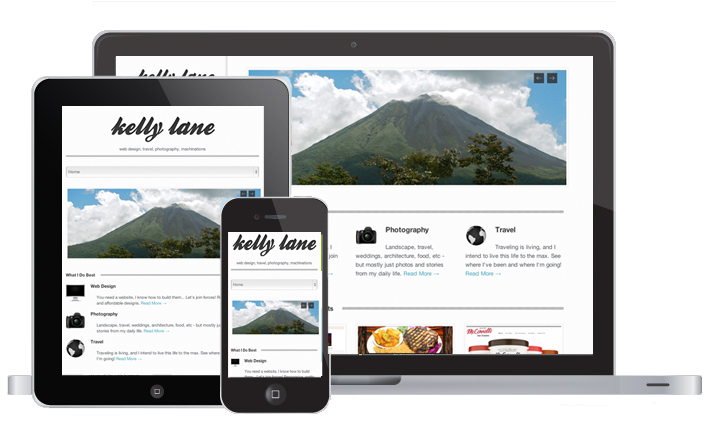
Things look a little different around here – especially if you’re visiting on a smartphone or tablet! I just switched over to a responsive design so that every device has the best user experience while being here. Let me know if you see anything broken or acting strangely… If you have a site that you want redesigned to be responsive – send me an email!

responsive web design

5 Tips to Optimize Your Site For Search Engines

2169333533_6bbfc24caf_z

The following are the five basic optimization techniques we use on every website. These ensure that your site adheres to the standards that search engines look for when it’s indexing a site.

There are always more advanced and costlier methods, but we start with these free tricks to lay the foundation and can scale up the operation based on how aggressive you want to be.

1. Google’s Keyword Tool

Before we begin any optimization work, we need to know what people are searching for and how they will find you. We use Google’s Keyword tool to research keywords that match your product/sales goals.

For example: if you’re selling iPhone cases, you might consider using the phrases “cell phone covers,” “cellphone cases” or “iphone cases” in your product descriptions. They are all different phrases for the same thing, but without any research you wouldn’t know the huge difference in results you could have based solely on naming conventions:

cell phone covers cell phone cases iphone cases
14,800 searches 246,000 searches 1,830,000 searches
Once you know the keywords people are using to search for things, you can use your findings across the entirety of the site to ensure that people searching for that phrase will find you.

2. Page URL Structure

After researching and pinpointing the keywords you want to gear your website towards, we take the keywords and use them in the page urls. For my Web Design business that is located in Santa Barbara, I would use something like “http://dejalane.com/santa-barbara-web-design”. Google stops indexing URLs after a certain amount of characters so you can’t cram every keyword into every URL, but if it’s something relevant to the page you should include it in the URL. The URL also helps inform users about the structure of the site, so we take that into consideration as well.

3. Headline Text

Google scans each page looking for header text, with the assumption that the headers hold relevant keywords to outline what the page is about. H1/Heading 1 text is given highest value, followed by H2 and H3, etc.

Heading 1 Text

Heading 2 Text

Heading 3 Text

Heading 4 Text

Once you know the keywords you want to use to target your intended audience, we try to include them in the heading titles so that they are found in both the page URL and again within the body of the page/article. Reinforcing the main keywords shows that the page is content-rich.

4. Cross-Linking

By cross-linking between areas of your site, you are helping guide users to other areas of content that might be relevant to the viewer. You can create cross-links by linking blog posts within your own site, have other sites link to you in exchange for you linking to theirs, add Facebook posts that link to your site or just add a link to your site on other pages when you write articles or comments. Search engines value pages that are referenced and linked to more, because their popularity makes them seem more relevant.

5. Image Titles

Make sure that you save images with keywords in the file name and give them alt text when you upload them so that Google and other devices can scan the images for keywords. Search engines have the same issue that blind people would have, they can’t read images! So you have to help them by including them in file names and alt text.

From Google’s Webmaster guidelines:

Images: Use the alt attribute to provide descriptive text. In addition, we recommend using a human-readable caption and descriptive text around the image.

PSD to HTML: Bringing Your Design to Life

santa_barbara_web_design_psd_to_html

Need to convert your PSD to HTML?

If you or your designer can create a layout for your website in Photoshop, we can convert it to HTML and turn it into a functioning website.

We often meet with clients who have the creative know-how to design beautiful layouts in Photoshop, but don’t have the CSS/HTML skills to make it work online. Let us do it for you!

What We Do

PSD to HTML
1. Splice up the Design

Break down the photoshop file so that the design will fit into the structure of a website: header, body content, footer, background, etc.

2. Recreate Elements in HTML/CSS

Code the basic structure of the site; add backgrounds, gradients, menu colors, fonts, rounded corners, side columns, you name it!

3. Test for W3C Compliance

Make sure that all of the design elements work across all browsers and are compliant with web standards.

If you have a design you would like us to review for you, contact us and let us see how we can work together!